
Set the screening criteria for a job
The “Criteria” tab lists contract, location, experience, languages and tools. Each criterion is “Essential”, “Important” or “Removed”.
- Job page, “Criteria” tab.
- Seven “Essential” criteria at most.
Criteria are the facts about the role that Bellamy screens on: contract, pay, location, experience, languages, tools. Bellamy fills them in from your brief, and you set what matters.
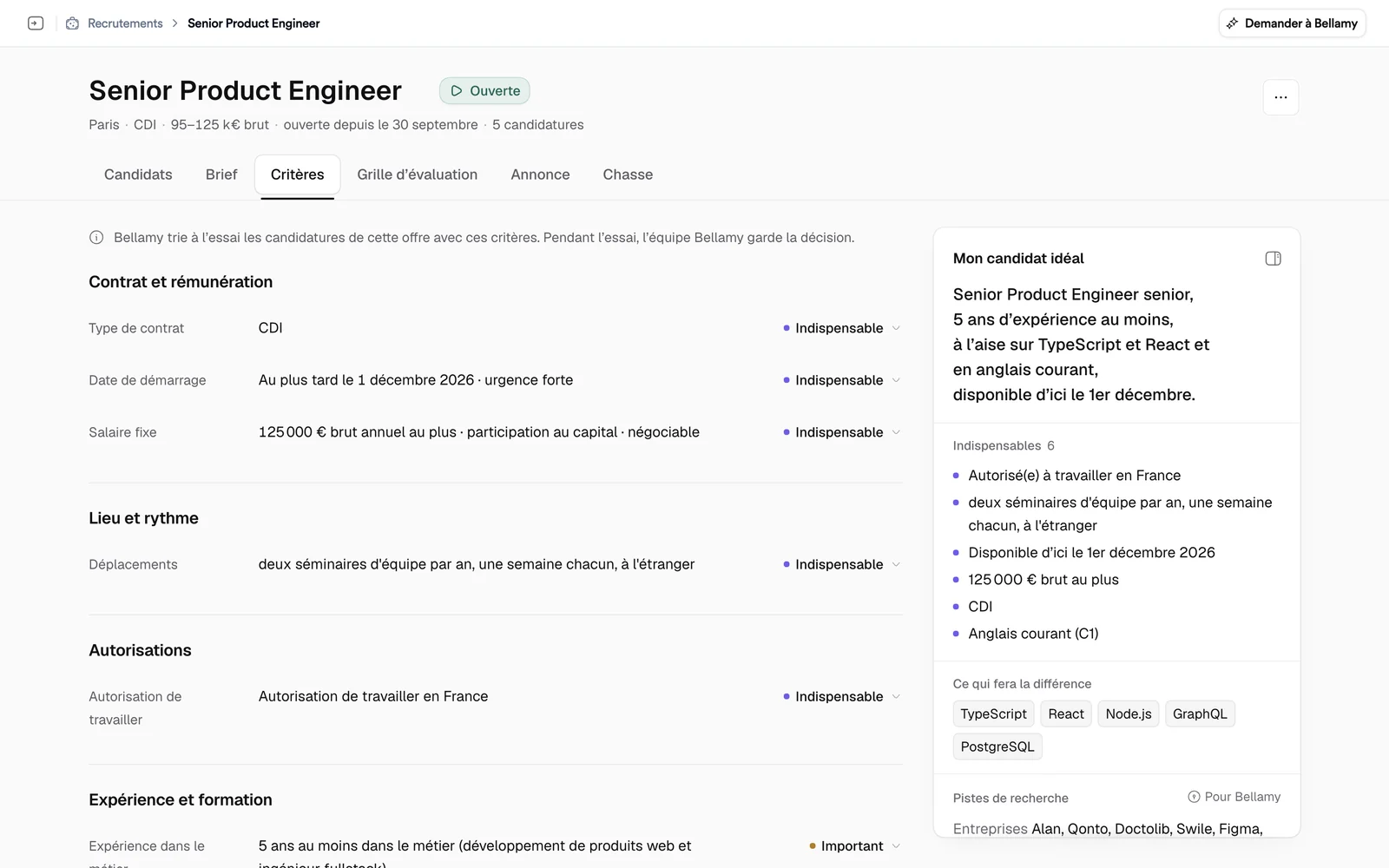
The sentence at the top of the tab
A sentence says where screening with these criteria stands. It changes from job to job. For example: “Bellamy is trial-sorting this job’s applications with these criteria. During the trial, the Bellamy team keeps the decision.” On a draft, it says Bellamy will screen as soon as the recruitment opens. The Bellamy team reviews the criteria once before the first sorting.
The criteria groups
- Contract and pay: contract type, status, start date, fixed salary.
- Place and schedule: workplace, hours and constraints, travel.
- Authorisations: work authorisation, certifications, licence and vehicle.
- Experience and education: experience in the field, in the sector, management, degree.
- Languages and tools.
- Your criteria: your own requirements, in one sentence.
The three levels
To the right of each criterion, a menu sets its weight:
- Essential: a candidate who doesn't meet it can be ruled out.
- Important: a plus that counts in the ranking.
- Removed: Bellamy ignores it.
There can be seven “Essential” criteria at most: “7 essential criteria at most. Set another one to Important first.” A job in live screening keeps at least one essential criterion.
Some criteria can't be “Essential”. A degree only can if you tick “This degree is required by law for this job”, and certifications only if you tick “Required by regulation”. A criterion under “Your criteria” counts without ever ruling out an application on its own.
Edit a criterion
- Click a criterion's value: an editor opens in place.
- Change the value. For some criteria (salary, date, distance), you can accept a margin: “Accepted with reservations up to …”.
- Click “Save”, or “Cancel”.
A “Saved at …” message states the effect of the change: for example, that Bellamy takes it into account for the next applications, or that your careers page shows the new value. Applications already kept or ruled out don't change.
In a location field, Bellamy suggests places as you type. If the suggestion service doesn't answer, the message “Place suggestions are unavailable: what you type is saved as is.” appears under the field: write the full location, it is kept as typed.
To add a requirement that isn't in the list, click “Add a specific criterion”.
If something goes wrong
- “These criteria were changed in the meantime”: a colleague or the Bellamy team changed the list. Reload it, then redo your change.
- “Not saved. Nothing changed.”: try again in a moment.
What's next
Criteria screen the candidates; the evaluation grid describes what you expect of them in substance.